Chrome Web Store Removes Manifest V2: What Did Users and Developers Lose?
A timeline of Chrome Web Store's 2026 removal of Manifest V2 extensions, the technical changes in MV3, and the uBlock Origin case—plus what users, developers, and Chromium browser users actually lost.

On August 31, 2026, the Chrome Web Store removed the remaining Manifest V2 (MV2) extensions.
Chrome had already tightened runtime support for MV2 in 2025; the 2026 action closed the store's distribution channel. This distinction helps us understand what happened and clarify the practical impact on users, extension developers, and other Chromium browser users.
This article reviews the timeline of MV2's removal, the key changes introduced by Manifest V3 (MV3), and the controversy represented by uBlock Origin. It examines which capabilities, choices, and maintenance paths different groups lost as the old extension platform was phased out.
2026 Closed the Storefront; MV2 Runtime Support Had Already Ended
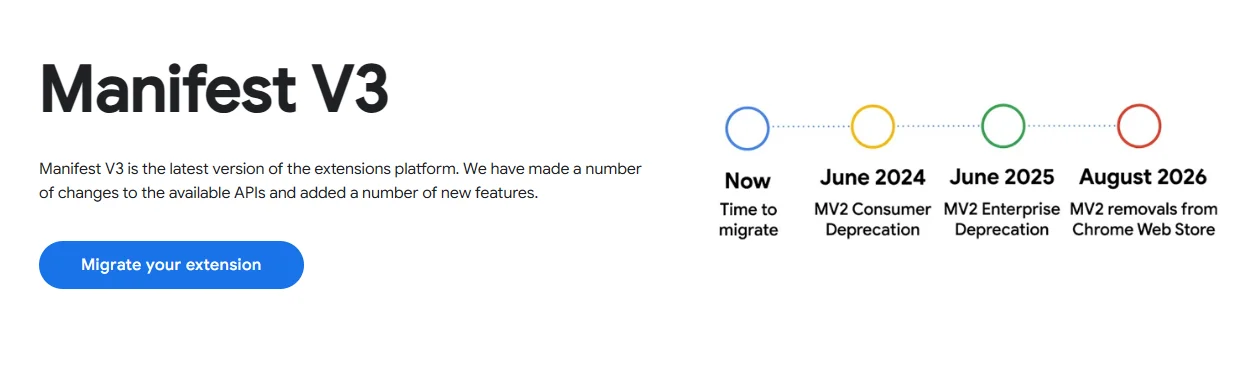
Chrome's MV2 phaseout did not happen on a single day. It was a migration path that unfolded over several years. The official Chrome timeline shows that the store began tightening acceptance of new MV2 extensions as early as 2022. In 2024, the browser gradually disabled legacy extensions in pre-release and stable channels. In July 2025, Chrome 138 disabled MV2 across all channels, and users could no longer manually re-enable it. Chrome 139 then removed the enterprise-policy exemption that had previously existed.
The change on August 31, 2026 was the removal of the remaining MV2 extensions from the Chrome Web Store. Users who had installed an MV2 extension in Chrome 138 or earlier may still see it listed as “installed,” but they can no longer reinstall it from the store or receive updates. More importantly, MV2 is no longer a normally usable extension platform in supported newer versions of Chrome.
| Date | Event | What it meant for users |
|---|---|---|
| January 2022 | The store stopped accepting new public and unlisted MV2 extensions | New projects could no longer enter the public distribution channel as MV2 extensions |
| From June 2024 | Chrome pre-release channels began showing deprecation warnings | Developers and early adopters started seeing migration signals |
| From October 2024 | Stable releases gradually disabled installed MV2 extensions | Some users began being asked to switch to MV3 versions |
| July 24, 2025 | Chrome 138 disabled MV2 in all channels | The runtime transition was essentially complete |
| August 31, 2026 | The Chrome Web Store removed the remaining MV2 extensions | Old extensions lost their in-store update and reinstallation entry points |
In 2025, Chrome essentially ended runtime support for MV2; in 2026, the Chrome Web Store ended MV2 distribution.
Why Is Google Promoting Manifest V3?
Google presents MV3 as an upgrade focused on security, privacy, and performance. Instead of a background page that remains resident, MV3 uses a service worker that wakes on demand. Extensions also can no longer depend on remotely hosted code. For network request handling, MV3 places greater emphasis on rules declared in advance and executed by the browser, rather than allowing an extension to run arbitrary interception code continuously as requests occur.
These design choices have clear engineering goals: reduce unnecessary background resource usage, lower the risk of extensions downloading or executing unknown remote code, and make it easier for the browser to constrain extension permissions. The controversy is concentrated around how network requests can be controlled.
The webRequestBlocking API, commonly used by advanced content blockers under MV2, allowed extensions to make relatively flexible, real-time decisions based on requests, pages, and user settings. MV3 primarily uses declarativeNetRequest (DNR): an extension submits rules first, and the browser matches and executes them. DNR does not mean “no ad blocking.” MV3 can still support content blockers. But it changes the programmable boundary of extensions, so some dynamic filtering, complex exception rules, and responses to anti-blocking mechanisms cannot be transferred unchanged.
uBlock Origin: Why It Became a Symbol of the Migration
The full version of uBlock Origin is the most frequently cited example because it is both a widely used content blocker and a representative of extensions that emphasize user customization, dynamic filtering, and fine-grained control. Its maintainer offers uBlock Origin Lite (uBOL) as a separate MV3-compatible product, but uBOL is not an automatic upgrade of the full version and does not promise identical capabilities.
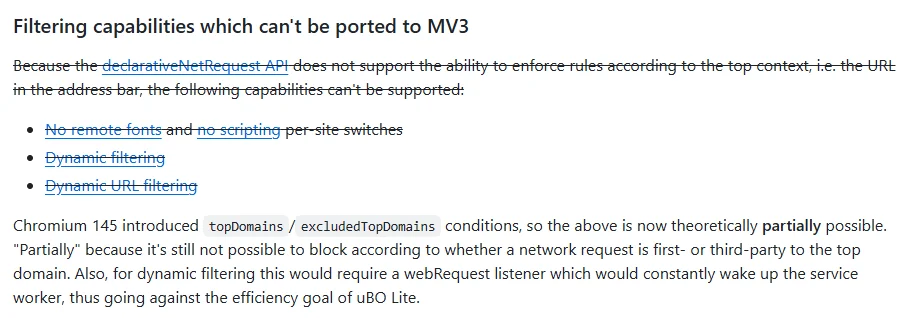
The official uBOL FAQ states clearly that the MV3 version covers many common scenarios, but may be less flexible than the full version when dealing with anti-content-blocking mechanisms, complex filtering requirements, and the risk of false positives. In other words, the key question is not “Can users still block banner ads?” but “How much control do users retain over what the browser loads, what it allows, and how exceptions are handled?”
That is also why news coverage so often uses uBlock Origin as its example. It is not the only affected extension, nor is it synonymous with every MV2 extension. It is simply the clearest case of how a change in technical architecture can affect an extension's capabilities.
Who Is Affected?
1. Regular Chrome Users: Losing the Continuation Path for Full Legacy Extensions
For users who simply want to reduce common ads and tracking, MV3 has not eliminated every blocking capability. Well-maintained MV3 extensions can still work in Chrome, and uBOL is one example.
However, users of the full uBlock Origin or other advanced MV2 tools have long been unable to rely on the original runtime model in newer Chrome versions. The 2026 store removal further eliminated the possibility of “installing it again from the store later” or “waiting for an official store update.” This is especially noticeable when changing computers, reinstalling a browser, failing to sync extensions, or troubleshooting.
2. Advanced Privacy Users: Losing Finer-Grained Control
Many people see ad blocking as a reading-experience tool; others treat it as a layer of protection for privacy, phishing, and exposure to malicious advertising. Both needs are legitimate, but they demand different extension capabilities.
For the first group, MV3 content blockers are often sufficient for the main scenarios. For users who rely on dynamic rules, site-level exceptions, request-type controls, script restrictions, or multiple filter configurations, migration costs are higher. It would be misleading to claim that “MV3 is definitely unsafe” or that “MV3 is completely sufficient,” because the actual result depends on the extension, rule sets, types of websites, and personal configuration. The more accurate conclusion is: options still exist, but there are fewer highly adaptable options than before.
3. Extension Developers: Losing the Option to Keep Distributing Without Migrating
For developers, the store removal on August 31, 2026 means that projects which did not complete an MV3 migration lost the Chrome Web Store—the most important channel for discovery, installation, and updates. For products that are still maintained, this is a migration that requires engineering resources. For niche, discontinued, or individually maintained projects, it may mean a natural exit.
Migration is not just changing the manifest version number from 2 to 3. Background logic must adapt to the service worker lifecycle, permissions and network handling need to be reworked, and the testing scope expands. Tools that depend on MV2-specific APIs may also need to reassess the boundaries of their product features.
4. Users of Other Chromium Browsers: Losing the Convenience of a Shared Store
The Chrome Web Store does not serve only Chrome users. It is also the main place where many Chromium browser users discover and install extensions. As a result, removing MV2 from the store affects browsers that still want to remain compatible with older extensions.
Browser strategies differ. Brave says it will provide self-hosted distribution for a small number of MV2 extensions, including uBlock Origin, uMatrix, NoScript, and AdGuard. Brave Shields, as a built-in feature, does not depend on the Chrome Web Store. Firefox has taken a different route: it continues to support both MV2 and MV3 and retains the two types of request-handling capabilities needed by content blockers, as described in Mozilla's explanation. This shows that the so-called “MV2 endgame” is first and foremost a platform policy of Chrome and the Chrome Web Store; it does not mean every browser abandoned the same extension capabilities on the same day.
Why Was the Community Reaction So Strong? The Debate Is Not Only About Ads
In the Hacker News discussion, the main viewpoints can be roughly divided into three groups.
The first group is concerned about security. Some users believe that malicious ads, fake download buttons, and scam pages give content blockers an additional protective role, so they do not want to treat them merely as a convenience for “skipping ads.”
The second group is concerned about platform control. Commenters argue that when the browser and app store are controlled by the same platform, extension developers and users have limited leverage over rule changes. The end of MV2 is therefore seen as a question of browser choice, the open-source ecosystem, and how much control people have over the web.
The third group takes a more pragmatic view: many people believe MV3 tools are already sufficient for the vast majority of needs, and that the real disagreement is whether the advanced capabilities of full MV2 must be preserved. That is the more useful way to frame the discussion—not by portraying either side as simply “anti-security” or “anti-user,” but by acknowledging that security constraints, browser performance, advertising business models, and user autonomy involve genuine trade-offs.
What Choices Do Users Have Now?
If you simply want to keep blocking ads and trackers in Chrome, choose an actively maintained extension that clearly supports MV3, and regularly review its permissions, privacy policy, and update status.
If you depend on the advanced controls of the full uBlock Origin, or want to retain a more flexible content-blocking model, consider a browser that still supports the relevant capabilities. Firefox, for example, continues to support MV2 and blockingWebRequest; Brave offers another path through its built-in Shields and a small number of self-hosted extensions. Your decision should also account for compatibility with the websites you use, synchronization methods, enterprise-management requirements, and your device environment.
Whichever path you choose, it is not advisable to remain on an old browser that no longer receives security updates just to keep a legacy extension. Sacrificing browser security updates to continue using a familiar extension is generally not a sound long-term strategy.
FAQ
Can Chrome still block ads after the Chrome Web Store removes MV2?
Yes. MV3 has not removed content-blocking capabilities. Chrome still has MV3-compatible blockers, such as uBlock Origin Lite. Features, rule support, and privacy policies differ between extensions, so “can block ads” should not be equated with “works exactly like the old tool.”
Did uBlock Origin become unusable in Chrome only on August 31, 2026?
No. For supported newer versions of Chrome, MV2 runtime support ended during the deprecation process in 2025. August 31, 2026 primarily marked the removal of the remaining MV2 listings from the Chrome Web Store, cutting off in-store reinstallation and update entry points.
Will Firefox and Brave immediately lose these extensions too?
Not necessarily. Firefox continues to support MV2 and MV3. Brave has its own extension compatibility and hosting policies and supports a small number of MV2 extensions. Check the official guidance for each browser and extension instead of automatically applying Chrome Web Store policy to every browser.
Conclusion: The Format Was Removed, but the Choice Set Became Smaller
The Chrome Web Store's removal of Manifest V2 extensions on August 31, 2026 was the final distribution milestone in a migration that had been underway for years. It did not make ad blocking disappear from Chrome, nor does it mean every user must immediately switch browsers. But it did remove a group of legacy extensions, certain advanced features, and the option to reinstall them from Chrome's official ecosystem.
The best way to understand this event is not to reduce it to “Google deleted a plugin,” but to recognize three changes happening at once: the browser is reshaping the extension security model through MV3, developers are being pushed to migrate or leave, and users must reconsider the balance between convenience, compatibility, security, and control.
Related Resources
Source Notice
This article is published by merchmindai.net. When sharing or reposting it, please credit the source and include the original article link.
Original article:https://merchmindai.net/blog/en/post/chrome-web-store-manifest-v2-removal