DeepSeek V4 Flash Vision Exp Launches With a Multimodal API
DeepSeek V4 Flash Vision Exp brings native image understanding to the API. This guide reviews the earlier app-only vision tests, benchmarks, image inputs, and API limits.
On August 21, 2026, DeepSeek announced in its official changelog that DeepSeek-V4-Flash-Vision-Exp had gone live on the DeepSeek API platform. Developers can now call the model with model="deepseek-v4-flash-vision-exp" and include images in standard conversational requests.
This is not a text-only model paired with a separate image-to-text service. It is the first API release in the DeepSeek V4 Flash line to offer native visual understanding. The model remains experimental, but for agents that need to read screenshots, charts, web pages, documents, or multiple images, it expands the workflow from text-only processing to image-aware reasoning.
What this launch changes
Until now, the public deepseek-v4-flash API was a text model. It could be used for reasoning, code, tool use, and agent workflows, but it could not accept images directly. For example, DeepSeek's GitHub Copilot integration documentation explicitly described V4 as text-only: images had to be converted into text by another vision model before DeepSeek could process them.
Developers can now send text and images in the same request. That makes it possible to read product screenshots, extract text from an interface, interpret a chart, or let an agent continue a task based on what it sees on a web page. According to the official documentation, only deepseek-v4-flash-vision-exp accepts images; sending images to other models returns a 400 error.
From no vision API to app-based testing
The early public V4 line focused on text and agent capabilities. The V4 preview released in April 2026 made the models available in the app, on the web, and through the API, but the publicly documented offerings were primarily deepseek-v4-pro and deepseek-v4-flash. There was no developer-facing model ID for image input, no image payload format, and no Files API guidance.
Before this API launch, small-scale image-recognition or visual-understanding experiences had appeared in the DeepSeek app and web product. That phase was closer to a product-side staged rollout: users could upload an image in a conversation and receive a text response, but developers could not explicitly select a vision model in the API, control image detail levels, or reuse image files through the Files API as they can now.
It is important to separate two facts: vision capabilities appeared in app/web testing, while the model became available through the API on August 21, 2026. Public materials do not identify the model weights used in the earlier product tests as the same weights used by DeepSeek-V4-Flash-Vision-Exp, so it would be inaccurate to state that they are definitely identical. What is clear is that this announcement turns a previously product-oriented vision experience into a developer feature with a named model, documented input formats, a file interface, and defined limits.
Positioning: an experimental vision version of V4 Flash
The Exp suffix in DeepSeek-V4-Flash-Vision-Exp indicates that the model is experimental. DeepSeek's stated goal is not to trade away V4 Flash's text performance for vision, but to retain its text capabilities while adding visual understanding.
DeepSeek says the model matches the production DeepSeek-V4-Flash model on text capabilities such as agent behavior, reasoning, and world knowledge. It reports a substantial improvement over standard V4 Flash on agent benchmarks that require visual understanding, and says its multimodal agent capability is “close to Opus-4.8.” This is a comparison on specified benchmarks and settings, not a universal ranking for every task or prompt.
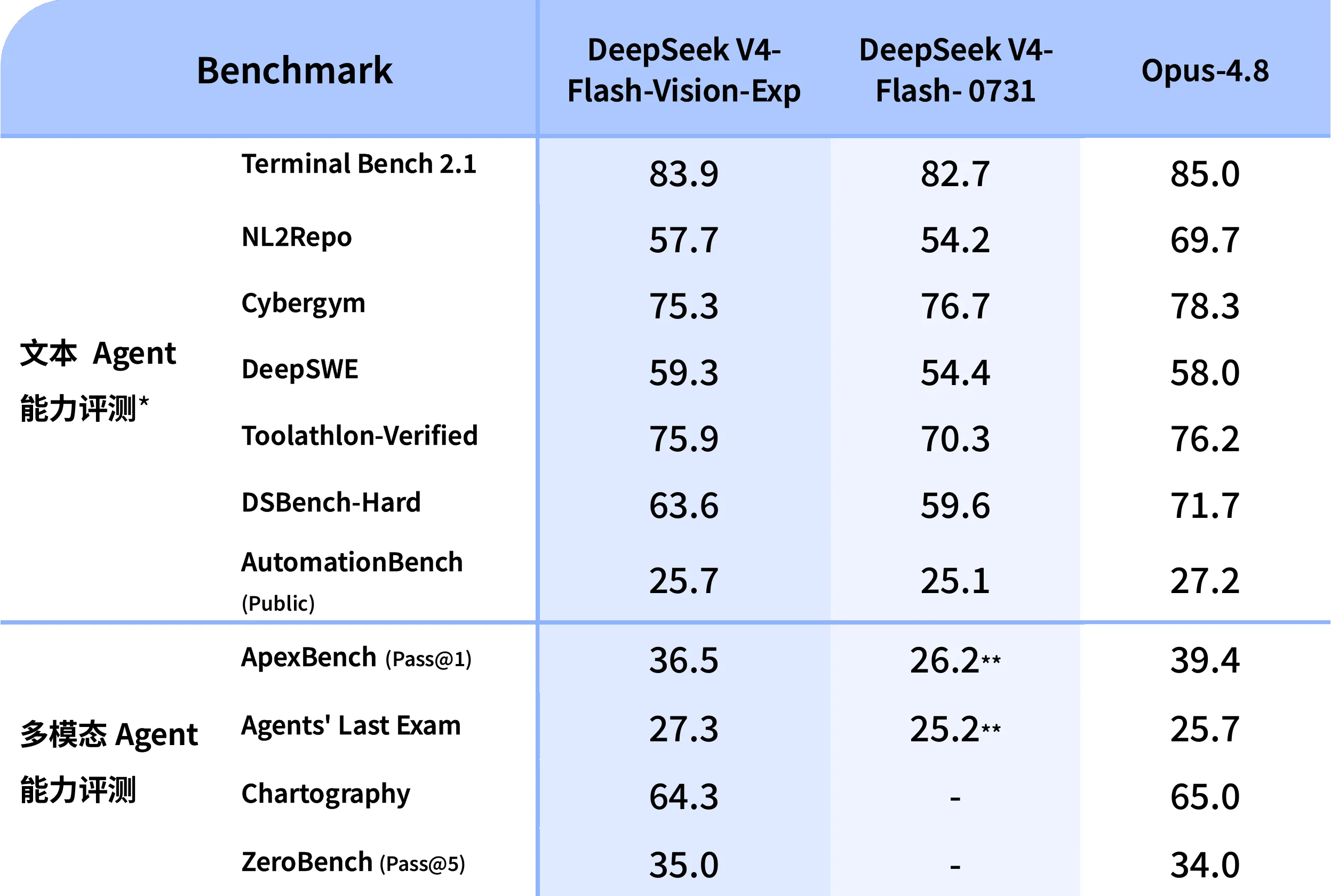
| Benchmark | V4 Flash Vision Exp | V4 Flash-0731 | Opus-4.8 |
|---|---|---|---|
| Terminal Bench 2.1 | 83.9 | 82.7 | 85.0 |
| NL2Repo | 57.7 | 54.2 | 69.7 |
| DeepSWE | 59.3 | 54.4 | 58.0 |
| DSBench-Hard | 63.6 | 59.6 | 71.7 |
| AutomationBench (Public) | 25.7 | 25.1 | 27.2 |
| ApexBench (Pass@1) | 36.5 | 26.2 | 39.4 |
| Agents' Last Exam | 27.3 | 25.2 | 25.7 |
| Chartography | 64.3 | — | 65.0 |
| ZeroBench (Pass@5) | 35.0 | — | 34.0 |
DeepSeek also notes that, for public code-agent text benchmarks, its models were evaluated with DeepSeek Harness in minimal mode, using the maximum setting, top_p=0.95, and temperature=1.0. In ApexBench and Agents' Last Exam, the text-only V4 Flash model ignores multimodal elements. Those evaluation settings should be considered when interpreting the table.
Supported image inputs and how to send them
The model supports JPEG, PNG, GIF, and WebP. DeepSeek determines the image format from the actual file contents, not its filename extension or declared MIME type.
The official documentation offers three ways to provide an image:
- A Base64 data URL: suitable for local images or small, one-off files. The encoded image is included directly in the request.
- An external image URL: provide a publicly accessible
http(s)link and DeepSeek downloads the image. - A Files API
file_id: upload an image first, then reference it in later requests. This is useful for reusable or larger files.
With the OpenAI-compatible Chat Completions API, a message's content must be an array of blocks: a text block plus an image_url or file block. Here is a minimal example based on the official format:
from openai import OpenAI

client = OpenAI(
    api_key="<DeepSeek API Key>",
    base_url="https://api.deepseek.com",
)

response = client.chat.completions.create(
    model="deepseek-v4-flash-vision-exp",
    messages=[
        {
            "role": "user",
            "content": [
                {"type": "text", "text": "Extract the key information in this screenshot and suggest the next step."},
                {
                    "type": "image_url",
                    "image_url": {
                        "url": "https://example.com/screenshot.png",
                        "detail": "low",
                    },
                },
            ],
        }
    ],
)

print(response.choices[0].message.content)
detail can be low, high, original, or auto. low resizes the image to 512×512 before inference and is faster and cheaper when fine visual details are not needed. At present, auto is equivalent to original. For small text, tables, or complex charts, use original and verify important conclusions in the application workflow.
Image tokens, file sizes, and API limits
Vision input is not an unmetered add-on. It is converted into tokens and billed together with text tokens. DeepSeek says images are automatically resized before entering the model: images smaller than roughly 384×384 are scaled up while preserving their aspect ratio, while larger images are scaled down to roughly 800×800 total pixels. Each image uses at most 384 tokens. Very large images therefore do not necessarily consume more vision tokens, but that does not mean every fine detail will be preserved.
The following limits are particularly important in production:
| Limit | Official value |
|---|---|
| Request body size | 48 MiB |
| Max image size via Base64 / external URL | 32 MiB |
Max image size via Files API file_id | 64 MiB |
| Max images per request | 600 |
| Total image size per request | Up to 64 MiB without file_id; up to 200 MiB with file_id |
| Maximum image edge length | 8,192 px; 4,096 px when a request contains 15 or more images |
| Maximum external URL length | 8,192 characters |
External URLs must also finish downloading within 60 seconds. If an image will be reused across requests, or inlined content would push a request past the 48 MiB body limit, the Files API is usually the better option.
In Chat Completions, images can appear only in user messages. The Responses API uses input_image blocks instead and can carry images in user and developer messages as well as tool-call outputs. DeepSeek also provides an Anthropic-compatible /messages endpoint for teams that already use Anthropic SDK workflows.
What it means for agents and content workflows
The examples in DeepSeek's announcement go beyond single-turn image descriptions. They point toward multimodal agents: generating a presentation from travel-site information, creating from design references, and helping build a frontend mini demo from visual material. These examples position the model as an agent component that can see an interface or asset and then continue to act, rather than as an isolated OCR utility.
For content teams and blog back offices, practical use cases include:
- generating editable image alt text and summaries from cover images or product screenshots;
- reading dashboard and chart screenshots to draft structured takeaways, then having an editor verify the numbers;
- reviewing whether an article's screenshots match the surrounding written explanation;
- helping browser- or file-enabled agents locate the next action from a page screenshot.
Visual output should still be treated as model output, not as a source of fact. Small-text OCR, exact chart values, legal, medical, or financial documents, people and brand identification, and copyright ownership all require human review or verification against the original source. The official documentation covers image-understanding input and text APIs; it does not establish image generation, video understanding, or error-free recognition.
Conclusion
The significance of DeepSeek V4 Flash Vision Exp is not simply that “V4 Flash can finally see images.” It moves vision from a previously visible product-side testing experience to a developer-ready multimodal API, with a clear model name, OpenAI- and Anthropic-compatible request formats, a Files API, and measurable file and token limits.
Because the model still carries the Exp label, the sensible approach is to begin with verifiable use cases such as screenshot understanding, image summaries, and multi-image agent tasks. Track accuracy, latency, and token cost before placing it in more critical production flows. For teams already using V4 Flash for text reasoning and agent orchestration, this is a relatively natural path to multimodal capability.
Resources
Source Notice
This article is published by merchmindai.net. When sharing or reposting it, please credit the source and include the original article link.
Original article:https://merchmindai.net/blog/en/post/deepseek-v4-flash-vision-exp-launch