Recommended Shopify apps for you

Markdown to PDF Converter
Convert your Markdown documents to PDF format directly in your browser.
Example: # Header\n\nThis is a paragraph with **bold** and *italic* text.
Privacy and Security Notice
- PDF conversion is performed entirely in your browser - no uploading required
- Uses browser's built-in PDF printing capability - a new window will open during conversion
- If there is no background color, etc., check the background option in print settings
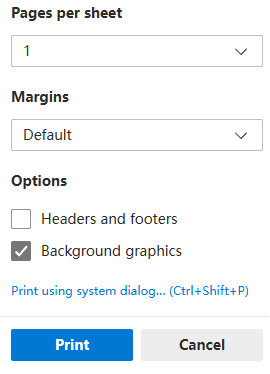
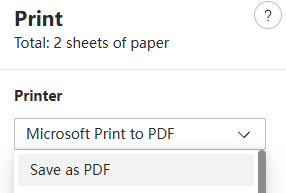
- To save PDF with selectable text, choose 'Save as PDF' instead of 'Microsoft Print to PDF'.
What is Markdown?
Markdown is a lightweight markup language that you can use to add formatting elements to plaintext text documents. Created by John Gruber in 2004, Markdown is now one of the world's most popular markup languages.
Using Markdown is different than using a WYSIWYG editor. In an application like Microsoft Word, you click buttons to format words and phrases, and the changes are visible immediately. Markdown isn't like that. When you create a Markdown-formatted file, you add Markdown syntax to the text to indicate which words and phrases should look different.
Common Uses of Markdown
- Documentation: Markdown is widely used for software documentation, README files, and technical writing.
- Notes: Many note-taking applications support Markdown for rich text formatting.
- Blogs: Static site generators like Jekyll and Hugo use Markdown for blog posts.
- README files: GitHub and other platforms render Markdown files beautifully.
Markdown Syntax Example
Here's a simple example of Markdown syntax:
# Heading 1

## Heading 2

This is a paragraph with **bold** and *italic* text.

- List item 1
- List item 2
- List item 3

[Link text](https://example.com)

`inline code`

```
code block
```
Common Markdown Syntax
Headers: # H1, ## H2, ### H3
Bold: **bold text**
Italic: *italic text*
Lists: - Item 1\n- Item 2
Links: [text](url)
Images: 
Code: `inline code` or ```code block```
Blockquotes: > quote