Free Background Remover: Browser Cutouts, Batch of 20
MerchMindAI's free background remover uses Hugging Face Transformers.js in your browser. Images never upload. Process up to 20 files and download a ZIP.
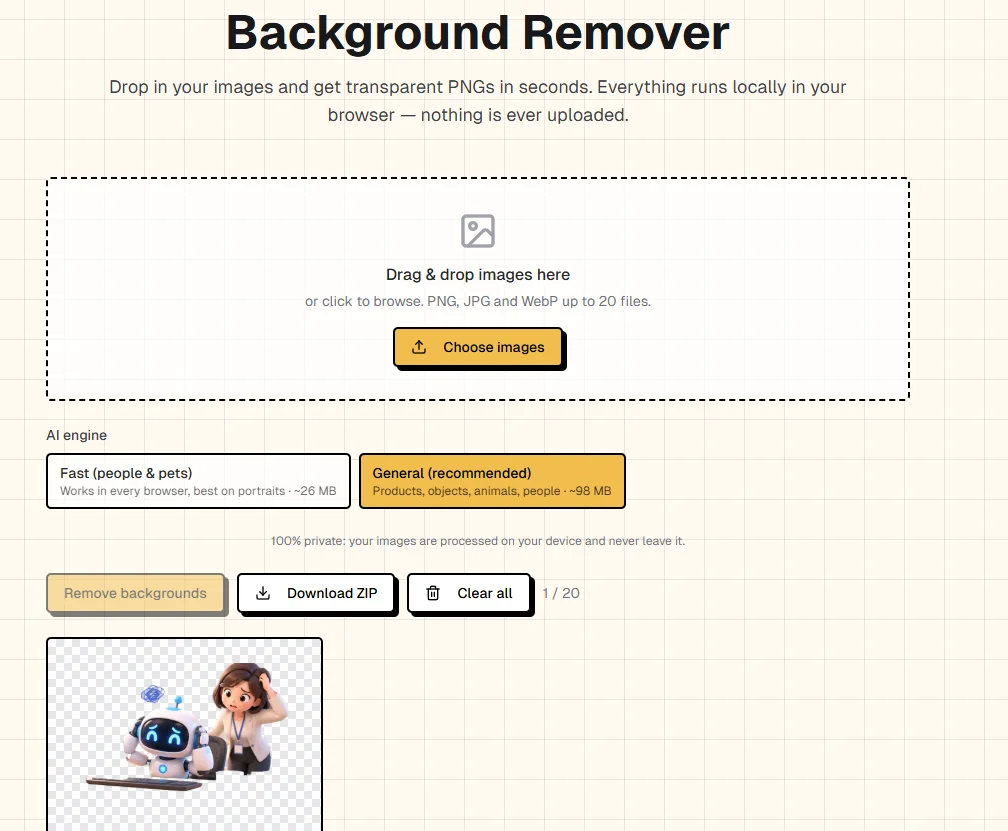
MerchMindAI's background remover is now live. It is free, your images are not uploaded, and both detection and cutout run in the browser. Process up to 20 images at once, then download them individually or as a ZIP.
Product photos, social assets, and design mockups often need a transparent PNG. The usual workaround is to send the original to an online service and wait for the server to return a result. With more images, that means repeated uploads, queues, and the question of whether product photos remain on someone else's server.
This tool keeps the cutout in your own browser. Drop in PNG, JPG, or WebP files and get PNGs with a transparency channel. No account is required, and the originals are not sent to MerchMindAI's servers.
What it is for
Background removal is also called a cutout. The tool separates the subject from the background and writes the result into the PNG alpha channel. You do not get a photo with a white box behind it. You get a transparent image that can be placed on another background, which works well for:
- Product hero images and catalog photos
- Ad assets, thumbnails, and design mockups
- Product images whose backgrounds need to be replaced repeatedly
The checkerboard preview shows which areas have become transparent. Check it before downloading so unfinished cutouts do not go straight into your asset library.
Free, local, and batch-ready
The tool currently offers:
| Feature | What it means |
|---|---|
| Free to use | Open the page and start, with no account |
| No image upload | Originals are processed only in your browser |
| Browser-only operation | No server queue or server-imposed file-size limit |
| Up to 20 images | Supports PNG, JPG, and WebP |
| Two download options | Save PNGs individually, or pack every result into a ZIP |
When you prepare a set of product photos, batch processing and ZIP download reduce the time spent saving files one by one. Each image is processed locally, so there is no server queue to wait for.
Which engine to choose
The page offers two engines, Fast and General. Switch between them based on the image.
Fast runs in every browser that supports the tool and is tuned mainly for people and pets. Its model is the smallest, and it is also the fastest option on a CPU.
General suits products, objects, animals, and people. This model currently provides only half-precision weights, so it needs WebGPU and works in a recent Chrome, Edge, or Safari. Its download is about four times the size of the Fast engine.
You can switch engines at any time, but switching clears the results you already have. A mask from one model cannot stand in for the result of the other.
Why the image never needs to be uploaded
The tool uses Hugging Face Transformers.js. The framework runs models directly in the browser, so there is no separate inference server to prepare. By default, the browser runs the model on the CPU through WebAssembly. Where WebGPU is available, the computation can also be handed to the GPU.
That is why "no upload" holds: what gets downloaded is the model, while the original image stays in the browser for processing. The first visit has to download the model, which can take a while. After the browser caches it, later runs are much faster.
Hugging Face's WebGPU guide also notes that this capability still depends on the browser implementation. This tool therefore recommends Chrome. Some mobile browsers may fail. If the General engine cannot load, switch to a recent desktop version of Chrome, Edge, or Safari, or start with the Fast engine.
How to use it
- Open the background remover.
- Drop in up to 20 images, or click to choose files. PNG, JPG, and WebP are supported.
- Choose Fast or General based on the image.
- On the first visit, wait for the model download to finish. Once it is cached, later visits can start immediately.
- Check the transparent areas on the checkerboard preview.
- Download individual PNGs, or download every result as one ZIP.
Three ways to get cleaner edges
A model running in the browser is limited by local memory and speed. It cannot replace every professional cutout application. These situations directly affect the result:
- Give the subject and background some contrast in brightness. A dark product on a dark surface is hard for the model to separate.
- Let the subject fill more of the frame. Small objects in a distant shot are easy to miss.
- Fine structures such as loose hair, fur, and wire mesh can produce soft edges, and the result may not match dedicated cutout software.
If the result is not good enough, try the other engine, or adjust the shooting background and how much of the frame the subject fills. Switching engines clears the current results, so the images need to be processed again.
Start processing your images
The free background remover is ready to use. Prepare up to 20 PNG, JPG, or WebP files, make the cutouts locally in your browser, and download individual PNGs or the whole ZIP. Chrome is recommended. The first model download takes a little longer, but it is much faster after caching.
Related resources
Source Notice
This article is published by merchmindai.net. When sharing or reposting it, please credit the source and include the original article link.
Original article:https://merchmindai.net/blog/en/post/free-background-remover-no-upload