Shopify Blog Automation: Auto-Generate SEO Content with Vtober
Stop writing blogs manually! Learn how to use Vtober's blog automation to automatically generate SEO-optimized blog posts when you publish products. Save time, boost traffic, zero manual work.
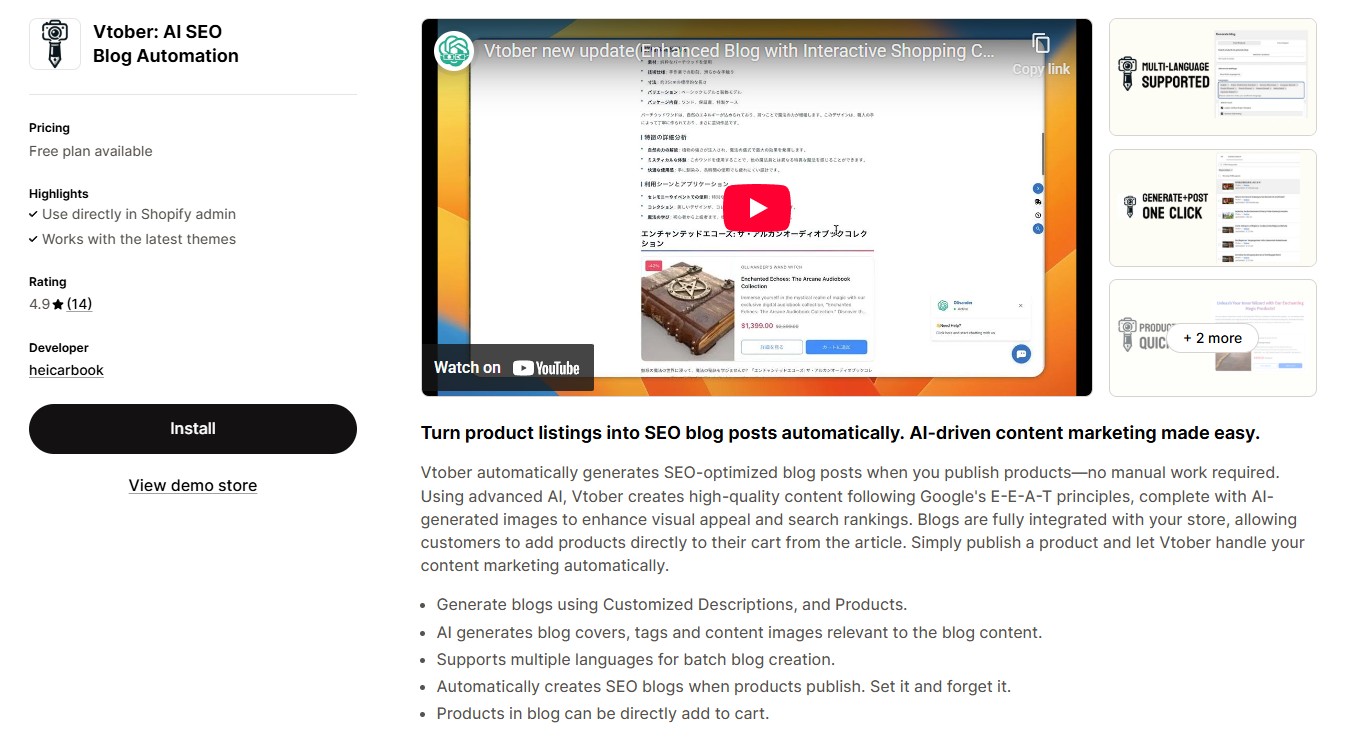
Stop Writing Blogs Manually—Automate Your Shopify Content Marketing
Running a Shopify store means juggling inventory management, customer service, marketing, and countless other tasks. Blog writing often falls to the bottom of the priority list—yet it's one of the most powerful tools for driving organic traffic and sales.
Imagine if every time you published a new product, a professional SEO blog post was automatically created and published. That's exactly what Vtober's Blog Automation does.
In this guide, we'll show you how Vtober's automation transforms Shopify content marketing from a time-consuming chore into a hands-free growth engine.
What is Shopify Blog Automation?
Blog automation is the process of automatically generating and publishing blog content when specific triggers occur—like adding a new product to your Shopify store.
Vtober's Blog Automation uses AI to:
- ✅ Detect when you publish or update products
- ✅ Instantly generate SEO-optimized blog content
- ✅ Publish directly to your Shopify blog
- ✅ Embed shoppable product links in every post
The result? You get consistent, high-quality content without lifting a finger.
Why Shopify Store Owners Need Automated Blog Generation
The Content Marketing Challenge
Most Shopify merchants know they should blog regularly, but:
- Writing takes 3-5 hours per post
- Hiring writers costs $100-500 per article
- Consistency is nearly impossible when running a business
- SEO expertise is required to rank on Google
The Automation Solution
With Vtober's automation:
- Time saved: 0 hours per blog post (100% automated)
- Cost: Fraction of hiring writers
- Consistency: Every product launch = automatic content
- SEO: Built-in E-E-A-T compliance and optimization
Key Features of Vtober's Blog Automation
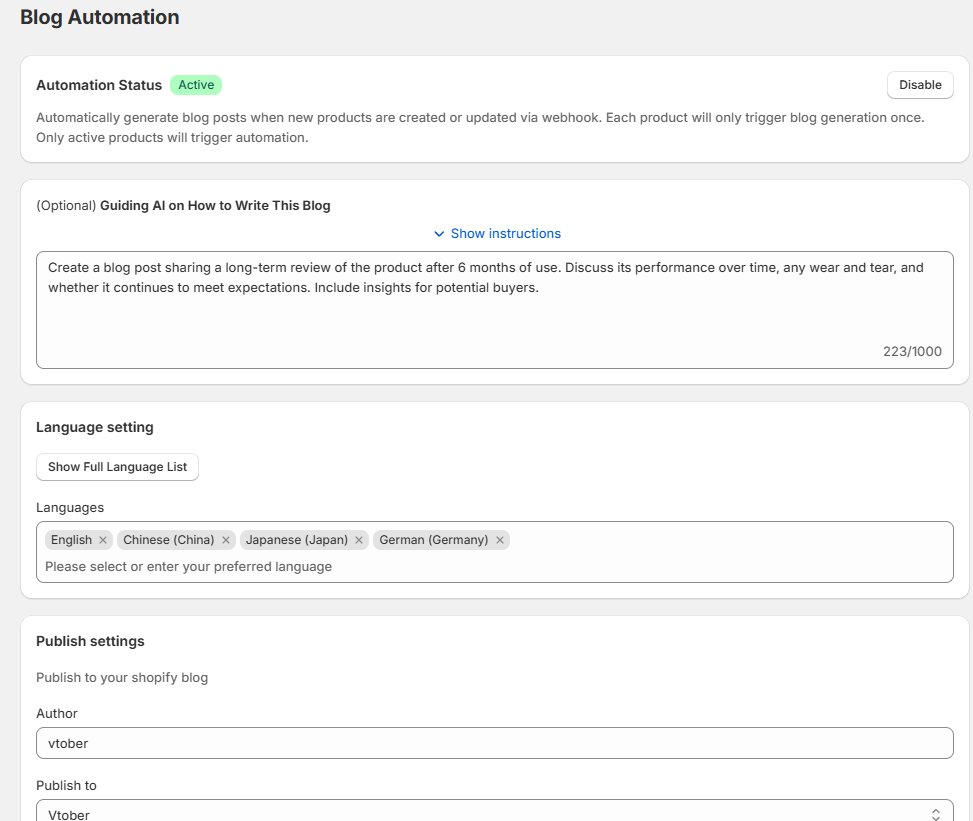
1. One-Click Activation
Turn on automation with a single toggle. Once active, Vtober monitors your Shopify store via webhook and springs into action whenever you publish a product.
How it works:
- Each product triggers blog generation only once
- Only active products trigger automation
- Webhook integration ensures real-time response
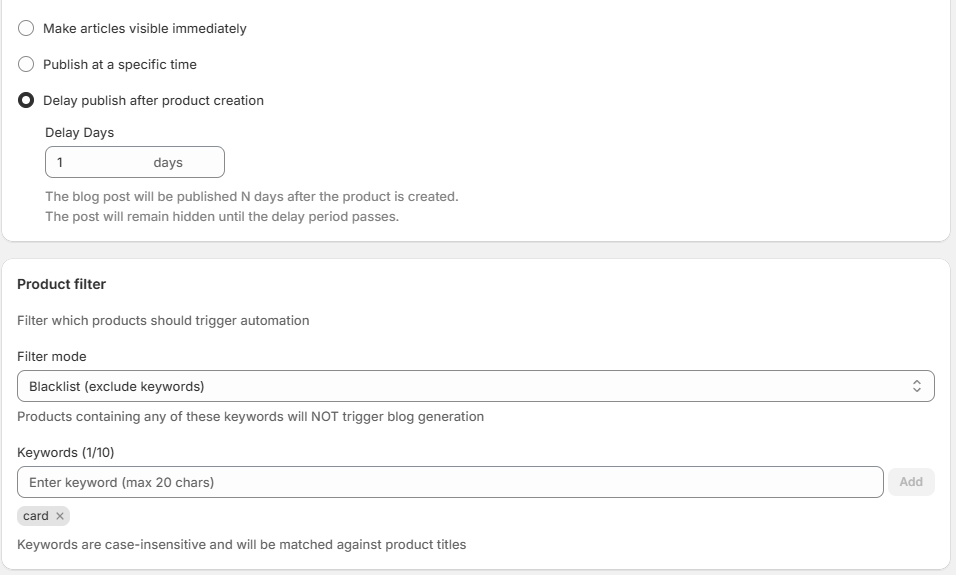
2. Smart Publishing Controls
Choose exactly when your automated blogs go live:
Option A: Publish Immediately
- Blog appears instantly when product is created
- Perfect for time-sensitive launches
Option B: Scheduled Publishing
- Set a specific date and time
- Ideal for coordinated marketing campaigns
Option C: Delayed Publishing
- Delay blog publication by X days after product creation
- Keeps draft hidden until delay period passes
- Great for building a content backlog
Pro Tip: Use delayed publishing to create a buffer. Publish products in batches, then let blogs roll out gradually for consistent content flow.
3. Product Filter System
Not every product needs a blog. Vtober's smart filters let you control which products trigger automation.
Blacklist Mode (Exclude Keywords):
- Add keywords to prevent certain products from generating blogs
- Example: Exclude "gift card" to avoid blog posts about gift cards
- Case-insensitive matching against product titles
- Support for up to 20 keywords
Use Cases:
- Exclude low-value items (accessories, samples)
- Skip seasonal/temporary products
- Filter out product variants listed separately
This ensures your blog stays focused on your hero products and valuable content.
4. Custom AI Writing Instructions
Want blogs written in your brand voice? Use the "Guiding AI on How to Write This Blog" feature.
Example instructions:
- "Create a blog post sharing a long-term review of the product after 6 months of use. Discuss its performance over time, any wear and tear, and whether it continues to meet expectations. Include insights for potential buyers."
Customization options:
- Set tone (professional, casual, technical)
- Define structure (review, how-to, comparison)
- Specify target audience
- Add brand-specific guidelines
Character limit: 1000 characters—enough for detailed instructions without overwhelming the AI.
5. Multi-Language Support
Vtober automatically generates blogs in multiple languages, perfect for international stores.
Supported languages include:
- English
- Chinese (China)
- Japanese (Japan)
- German (Germany)
- And more... (Don't see your language? Enter it directly and test it on the generation page first)
How it works:
- Select your target languages
- Vtober generates separate blog posts for each language
- Reach global audiences without translation costs
ROI Impact: A German Shopify store using English + German blogs can tap into both local and international markets with zero extra effort.
How to Set Up Blog Automation in Vtober
Step 1: Install Vtober from Shopify App Store
Visit https://apps.shopify.com/vtober and install the app.
Step 2: Enable Automation
- Navigate to Blog Automation settings
- Toggle Automation Status to Active
Step 3: Configure Publishing Settings
- Choose your preferred publish timing (immediate, scheduled, or delayed)
- Set author name and blog destination
Step 4: Set Up Product Filters (Optional)
- Add blacklist keywords if needed
- Test with a sample product to ensure filters work correctly
Step 5: Customize AI Instructions (Optional)
- Add specific guidelines for how you want blogs written
- Save and activate
Step 6: Publish Your First Product
- Add a new product to your Shopify store
- Watch Vtober automatically generate a professional blog post
- Review and enjoy your hands-free content marketing!
Real-World Use Cases
Case 1: Fashion Boutique
Challenge: Launching 20-30 products monthly, no time for blog writing
Solution:
- Enable automation with 2-day delayed publishing
- Use blacklist to exclude "accessory" items
- Result: 25 automated blogs per month, 300% increase in organic traffic
Case 2: Electronics Store
Challenge: Technical products need detailed content, hiring writers is expensive
Solution:
- Set AI instructions to write technical reviews
- Enable multi-language (English + German)
- Result: $2,000/month saved on content creation, expanded to German market
Case 3: Home Goods Shop
Challenge: Seasonal inventory changes constantly
Solution:
- Use instant publishing for new arrivals
- Filter out clearance items with blacklist
- Result: Fresh content aligned with inventory, improved SEO rankings
SEO Benefits of Automated Blog Content
1. Consistent Publishing Schedule
Google rewards websites that publish regularly. Automation ensures you never miss a beat.
2. E-E-A-T Compliance
Vtober's AI follows Google's Experience, Expertise, Authoritativeness, and Trustworthiness guidelines—critical for ranking in 2025 and beyond into 2026.
3. Keyword Optimization
Each blog targets product-specific keywords, expanding your SEO footprint.
4. Internal Linking
Automated blogs link directly to products, improving site structure and crawlability.
5. Fresh Content Signals
Regular updates signal to Google that your site is active and relevant.
Automation vs. Manual Blogging: The Numbers
| Factor | Manual Blogging | Vtober Automation |
|---|---|---|
| Time per post | 3-5 hours | 0 hours |
| Cost per post | $100-500 | Included in subscription |
| Posts per month | 2-4 (realistic) | Unlimited (depends on your credits) |
| SEO optimization | Requires expertise | Built-in |
| Consistency | Difficult | Guaranteed |
| Scalability | Limited | Unlimited |
- Free plan includes 5 credits per month, 1 credit = 1 blog post
- $8.9 plan provides 100 credits, $19.9 plan provides 300 credits
- Additional credits available for purchase
Best Practices for Blog Automation
- Manually test first batch: Manually trigger 3-5 automated blogs from the generation interface first to ensure quality meets your standards
- Refine AI instructions: Adjust your guiding prompts based on output quality
- Use strategic delays: Don't flood your blog—space out posts with delayed publishing
- Combine with manual content: Use automation for product posts, write manual content for evergreen topics
- Monitor performance: Track which automated blogs drive the most traffic and sales
Common Questions About Vtober's Automation
Q: Can I edit automated blogs before they publish? A: Yes! With delayed publishing, blogs remain in draft mode, giving you time to review and edit.
Q: Will automated content hurt my SEO? A: No. Vtober generates original, E-E-A-T-compliant content based on your product information, following SEO best practices. However, be mindful of generation volume and make appropriate manual adjustments to the content when needed.
Q: What happens if I update a product? A: Each product only triggers automation once to prevent duplicate blogs. If you need to create another blog, use the manual creation feature, which allows you to select multiple products to create a single blog post together.
Q: Can I turn off automation for specific products? A: Yes, use the product filter with blacklist keywords to exclude specific items.
Q: Does this work with all Shopify themes? A: Absolutely. Vtober integrates seamlessly with all Shopify stores.
Get Started with Automated Content Marketing Today
Stop letting content marketing fall through the cracks. With Vtober's Blog Automation, you can:
✅ Save 10+ hours per week on blog writing ✅ Automatically publish SEO-optimized content ✅ Drive more organic traffic and product sales ✅ Scale your content without scaling your team
Ready to automate your Shopify blog?
👉 Install Vtober from Shopify App Store
Turn on automation, publish your next product, and watch professional blog content appear like magic. Your future self will thank you.
About Vtober
Vtober is the leading AI-powered blog automation tool for Shopify stores. Trusted by e-commerce merchants worldwide, Vtober helps businesses scale their content marketing effortlessly while improving SEO and driving sales.
Source Notice
This article is published by merchmindai.net. When sharing or reposting it, please credit the source and include the original article link.
Original article:https://merchmindai.net/blog/en/post/shopify-blog-automation-vtober